Report 1642: Facility Utilisation (W5)
This version is superseded. Click here to view the latest guide.
PURPOSE
To provide the details used by CS Lucas to show the Facility Utilisation.
WHY IS THIS IMPORTANT?
Allow users to verify the details of Facility Utilisation.
QUERY
1. Navigate to Reporting > Standards > Report 1642: Facility Utilisation.
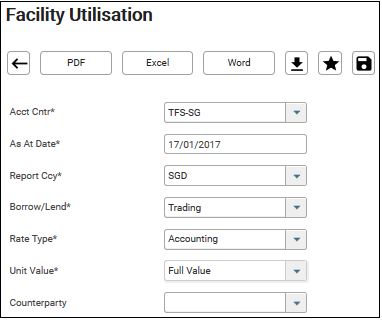
2. Fill in the mandatory parameter – Acct Cntr, As At Date, Report Ccy, Borrow/Lend, Rate Type and Unit Value.
3. Click on the required format.
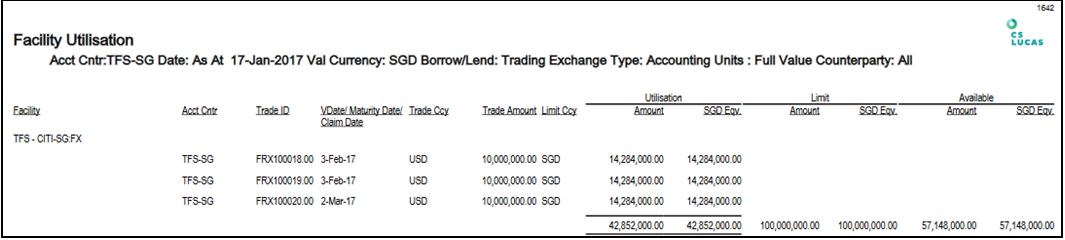
4. The report shows the Facility, Accounting Centre, Trade ID, VDate/MDate, Trade Ccy, Trade Amount, Limit Ccy, Utilisation, Limit and Available Amount.
For explanation of  button, please see link.
For explanation of  buttons, please see link.
DATA SOURCE
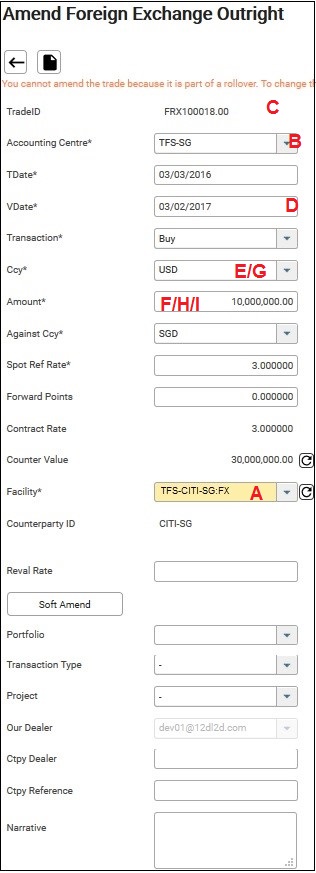
To view the following transaction,

Follow the steps as shown below:
1. Navigate to Transaction > Foreign Exchange.
2. Select Acct Cntr* (From example: TFS-SG)
3. Key in the VDate Fr* (From example: 17/01/2017)
4. Click Refresh.
FREQUENTLY ASKED QUESTIONS
FAQ01. Why are some facilities not shown in the 1642 Facility Utilisation Report?
Only facilities with utilisation transactions as of the reporting date are included in the 1642 Facility Utilisation Report.
Facilities that do not have any utilisation transactions as of the reporting date will not be displayed in the report.
RELATED INFORMATION
General Formatting For All Reports
CHANGE HISTORY