Report 3012: Monthly Revaluation – MM Trades
PURPOSE
To provide the details used by CS Lucas to show the Monthly Revaluation – MM Trades.
WHY IS THIS IMPORTANT?
Allow users to verify the details of Monthly Revaluation – MM Trades.
QUERY
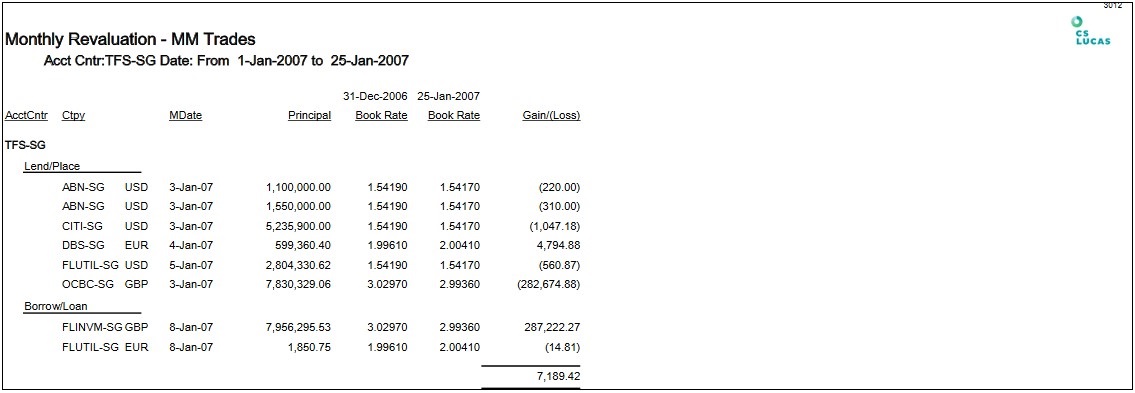
1. Navigate to Reporting > Standards > Report 3012: Monthly Revaluation – MM Trades.
2. Fill in the mandatory parameter – Acct Cntr, From Date and To Date.
3. Click on the required format.
4. The report shows the Accounting Centre, Counterparty, MDate, Principal, Book Rates and Gain/loss.
For explanation of  button, please see link.
For explanation of  buttons, please see link.
DATA SOURCE
To view the following transaction,
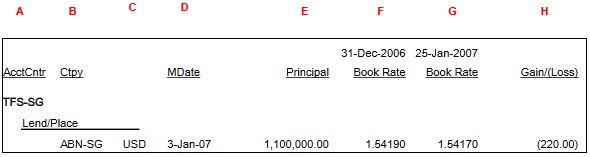
Follow the steps as shown below:
1. Navigate to Transaction > Money Market.
2. Select Acct Cntr* (From example: TFS-SG)
3. Key in the MDate Fr* (From exmaple: 01/01/2007)
4. Click Refresh.
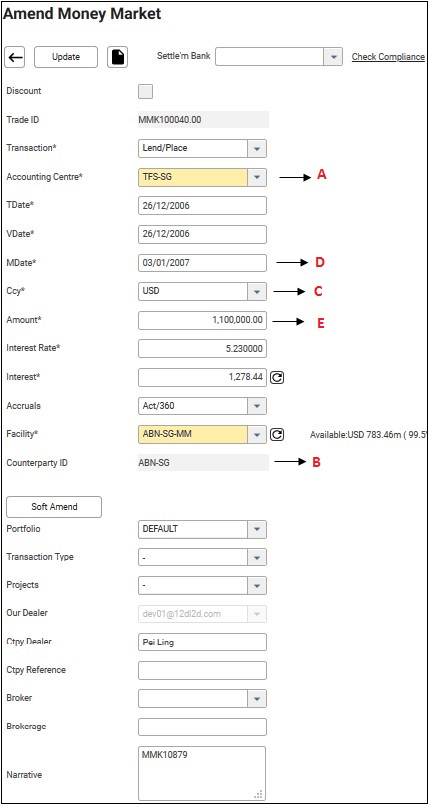
Book Rates: Navigate to Prices > Exchange Rate 
Gain/(Loss): Principal * 
FREQUENTLY ASKED QUESTIONS
RELATED INFORMATION
General Formatting For All Reports
CHANGE HISTORY